- DATE:
- AUTHOR:
- Asset Management for Jira team
What’s New: Retriever Integration, Asset Reservations, & More
This month's release brings a new integration with Retriever, for device off-boarding, Customer Portal asset reservations, three new custom field types, and a refreshed Settings experience.
Here's what's new:
 Retriever Integration
Off-boarding just got easier. AMFJ now integrates with Retriever (formerly Hello Retriever), a third-party device-return service, to help you recover hardware from remote employees.
Connect your Retriever account to AMFJ using your Retriever API key.
From any asset record, click Start Return to kick off a device return.
Track the return's progress in your Retriever dashboard.
 Learn more: Retriever Integration
 Reservations Through the Customer Portal
Not every asset needs a single owner. Shared resources — like conference room equipment or loaner laptops — get used by different people for short windows of time.
Reservations make it easy to book that kind of asset right from the JSM Customer Portal, without assigning a permanent loanee.
Admins configure which request types can book which asset types via Settings → Reservations.
Requesters pick an asset, a duration, and a date/time right in their request — with support for hourly, daily, or multi-day bookings.
AMFJ prevents overlapping bookings automatically, and releases the asset when the request is cancelled or resolved.
Admins can track everything in the AMFJ Reservations calendar. Learn more: Setting up asset reservations
 Three New Custom Field Types
These new field types are available for assets, giving you more flexible ways to model your data.
Currency field — Create a new Currency field, or set the currency option on an existing field, and choose from 22 currency options.
Checkbox field — Use Checkbox fields for simple Yes/No tracking, like "Encrypted" or "Deployed."
Multi-select field — Use Multi-select fields when an asset needs more than one value at once — think installed applications, available features, or overlapping categories.
Learn more: What are Asset Types
 Asset Management in Rovo Chat
The Asset Management agent is now available in Rovo Chat in Jira. Ask it about your assets, licenses, accessories, people, and locations in plain language.
You can also make changes: check an asset out or in, assign or revoke a license seat, hand out or take back an accessory, and create assets, accessories, licenses, locations, and people.
Learn more: Asset Management in Rovo Chat
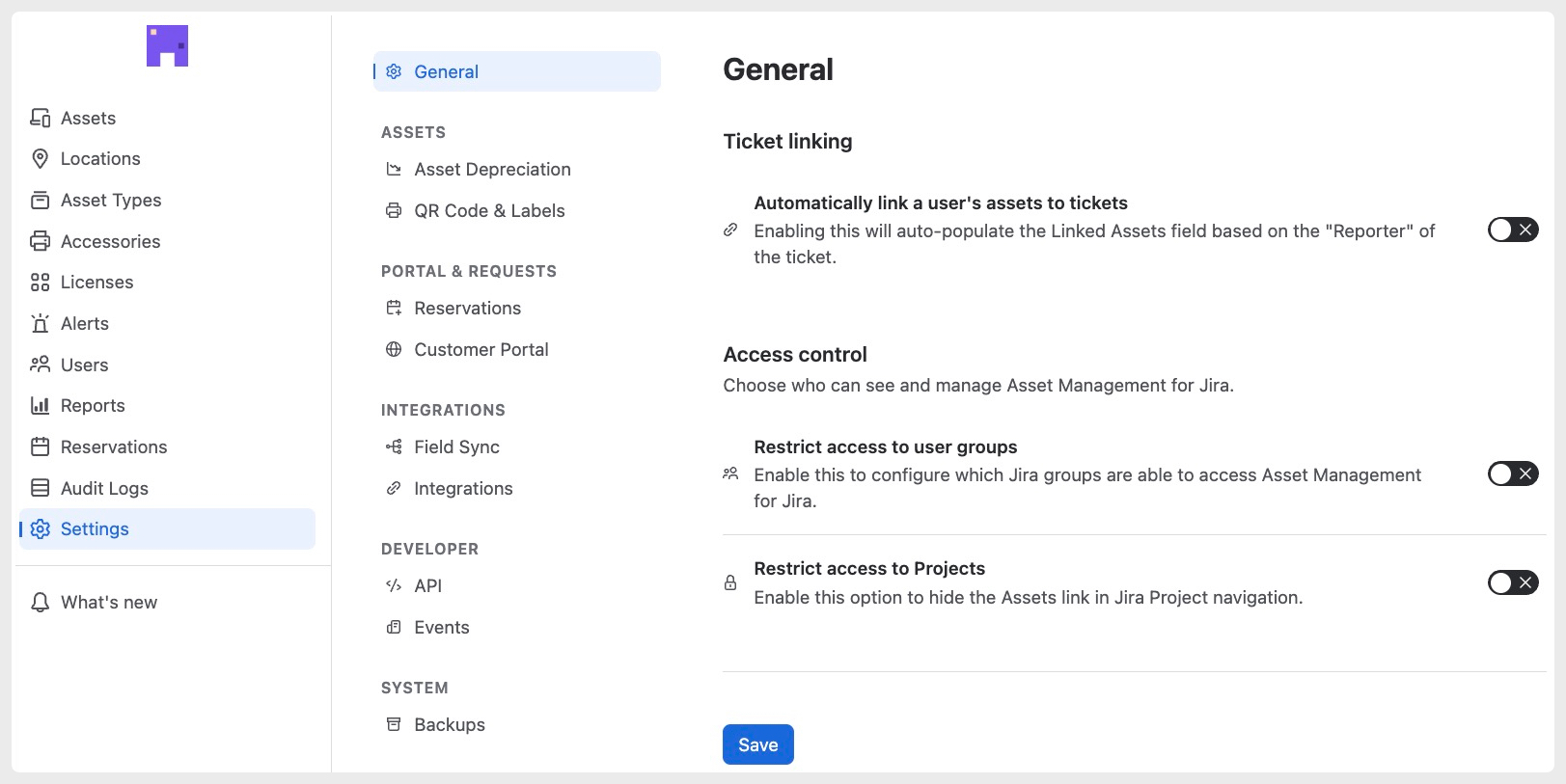
 Refreshed Settings Navigation
Settings has a cleaner look with a new left-hand navigation menu, grouped by category (Assets, Portal & Requests, Integrations, Developer, and System), making it easier to find what you need as AMFJ continues to grow.
If you have any feedback related to this new look as well as any of these new features please don't hesitate to reach out to us at support@assetmanagementforjira.com